

Services & fixed-price packages
Sell consultations, design packages or service bundles with one-time Stripe prices. Keep each offer’s title, price and payment link connected to its WordPress landing page.
Example: a consultation or design package
WORDPRESS + STRIPE · MICROBITE STRIPE CATALOG
Sell services, subscriptions and digital products through Stripe, with your catalog managed in WordPress. Update products, prices and payment links from one screen—and keep connected website pages up to date.
No WooCommerce required · Licence for up to 100 websites · Version 1.9.2
A SIMPLER CATALOG WORKFLOW
01
Bring Stripe products, prices and payment links into WordPress.
02
Change a price or billing interval and create its replacement payment link.
03
Shortcodes and Elementor tags use the updated catalog values.
Create, edit and organise
One-off and recurring
Stripe-hosted checkout
Reusable catalog values
WHAT IS STRIPE CATALOG GOOD FOR?
Microbite Stripe Catalog is a WordPress plugin for businesses using Stripe Payment Links. Bring your offers into one catalog and reuse their details wherever you build your website.
Sell consultations, design packages or service bundles with one-time Stripe prices. Keep each offer’s title, price and payment link connected to its WordPress landing page.
Example: a consultation or design package
Manage monthly, quarterly or annual offers. Set a new price for future sign-ups while existing subscribers retain their current price.
Example: monthly website care
Present an ebook, template pack or course offer on WordPress and send buyers to Stripe checkout. Use your preferred tool for file delivery or access.
Example: a downloadable toolkit
Reuse catalog details across landing pages with friendly slugs, shortcodes and Elementor dynamic tags. The licence includes up to 100 website activations.
Example: a portfolio of client websites
Set address collection and free or paid shipping on one-time Payment Links. Keep product descriptions, prices and checkout buttons on your WordPress pages.
Example: a small merchandise range
Reuse a product’s title, price and checkout link across pages. Manage the offer in the catalog instead of manually replacing connected values around your site.
Example: a seasonal service campaign
Stripe Catalog manages your products, pricing and payment links. Pair it with your chosen tools for bookings, digital delivery or membership access.
INSIDE THE PLUGIN
Actual screenshots from our WordPress demo, using fictional products in Stripe TEST mode. Select a screenshot to view it at full size.
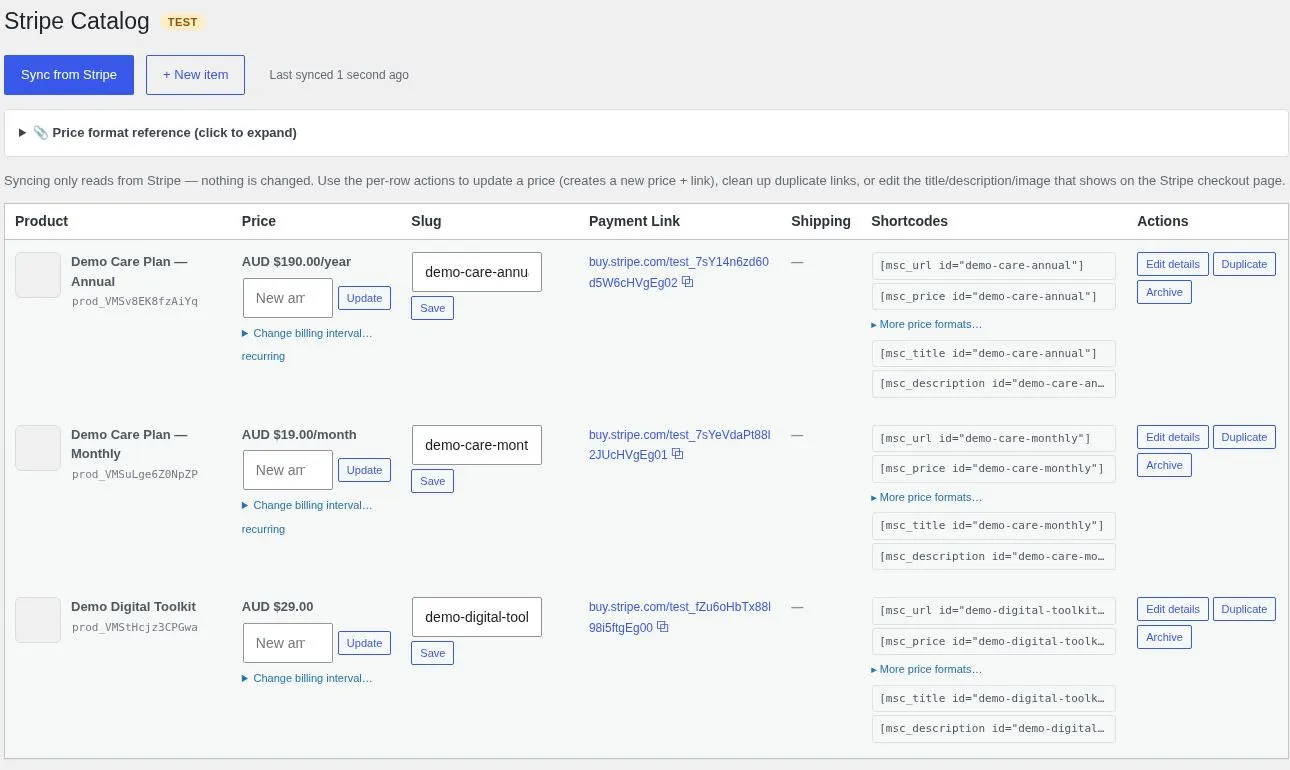
One-time, monthly and annual demo offers, with payment links and ready-to-use shortcodes.
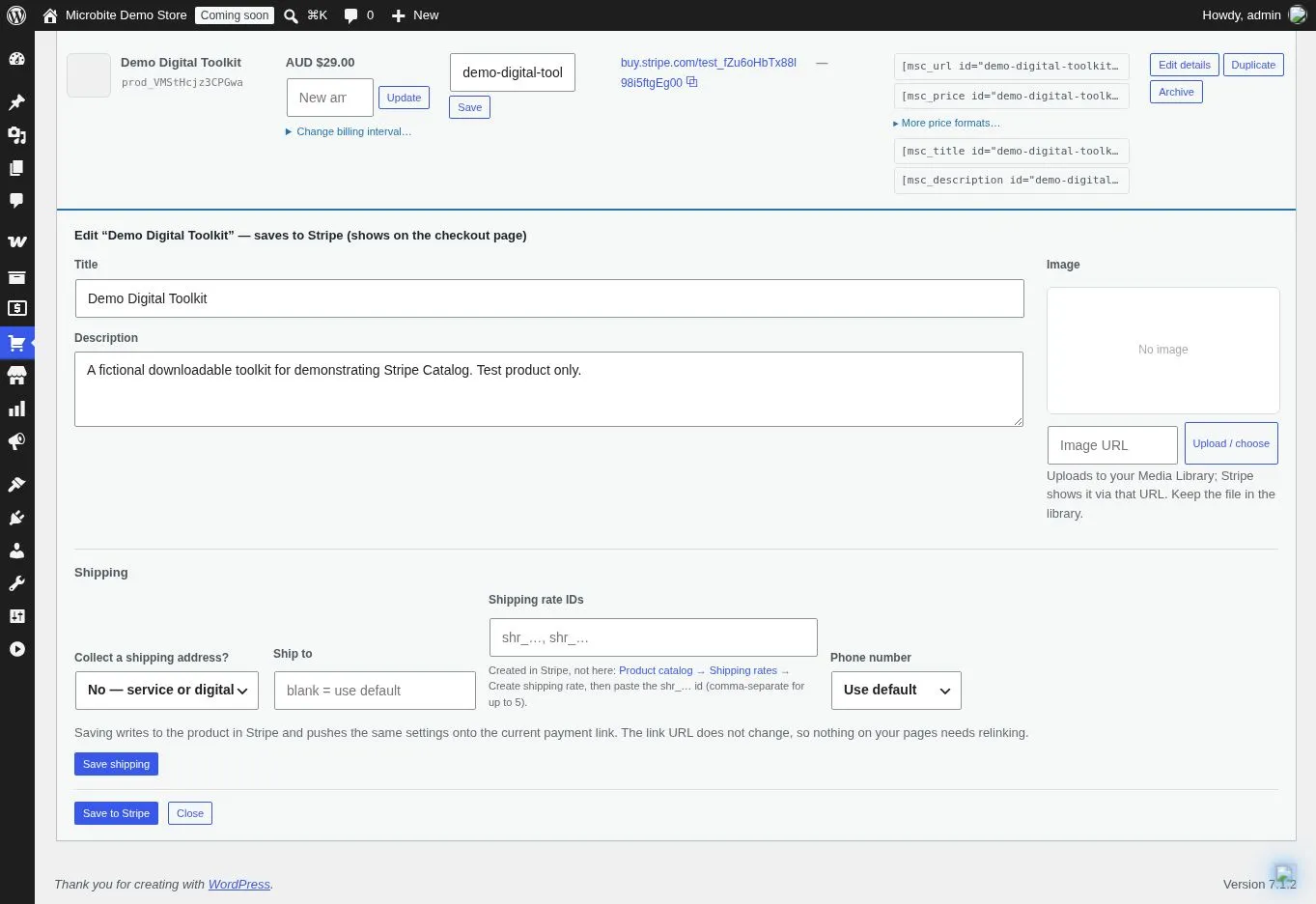
Manage product titles, descriptions and images, plus address and phone collection for checkout.
LESS COPYING. MORE CONTROL.
Built for businesses selling services, subscriptions or a focused product range through Stripe Payment Links. WooCommerce is not required.
01
Sync Stripe products, prices and payment links into an organised WordPress table. Give products friendly slugs so their website references are easy to recognise.
02
Update a product’s price to create a new Stripe price and payment link. Connected shortcodes and Elementor tags use the updated values without rebuilding your page.
03
Create one-time offers or recurring prices using a count and a day, week, month or year interval. Change the cadence for new sign-ups while existing subscriptions retain their current price.
04
Add a product, its price and payment link from WordPress. Duplicate an existing item to start a new offer, or update its title, description and image in Stripe.
05
See products with multiple active links and deactivate older duplicates. Choose whether price changes deactivate previous links and set the replacement price as the product default.
06
Configure address collection, allowed countries, phone collection and free or paid shipping. Spot mismatches and repair the primary payment link’s shipping settings.
FROM CATALOG TO CHECKOUT
01
Install and activate your licence, connect your Stripe test or live key, and sync the catalog. Review the products and the visible TEST or LIVE mode badge.
02
Assign a product slug and use its shortcodes or Elementor dynamic tags for the title, price, description, image and payment link.
03
Update the price or billing cadence in the catalog. The plugin creates a replacement price and payment link for new customers; existing subscribers are not migrated.
BUILT FOR YOUR WORDPRESS PAGES
Display a product’s payment-link URL, price, title, description or image, or add a ready-made purchase button. Reference a friendly slug or the Stripe product ID. Use these in WordPress areas that process shortcodes.
Choose a product in the Stripe Catalog dynamic-tag group and connect its payment link, price, title, description or image to a compatible Elementor widget field.
GETTING STARTED
Download version 1.9.2 after purchasing. In WordPress, go to Plugins → Add New → Upload Plugin, install the ZIP and activate it. Then open Stripe Catalog → Manage License and activate your licence. PHP 7.4 or later is required.
Open Stripe Catalog → Settings and enter your Stripe secret key. Start with test mode and a test catalog to check the workflow before managing live offers.
Open Catalog and choose Sync from Stripe. Review the mode badge and primary price for each product. The first sync can adopt existing shipping settings into Stripe product metadata.
Assign product slugs, add the shortcodes or Elementor dynamic tags, and preview the page and its checkout link. Resync after changes made directly in Stripe.
BEFORE YOU GET STARTED
No. Microbite Stripe Catalog connects WordPress to your Stripe catalog and Stripe Payment Links. It is useful for services, subscriptions and smaller product ranges that do not need a WooCommerce storefront.
The plugin creates a new price and payment link for new customers. It does not migrate existing subscriptions to the replacement price. Existing subscribers keep the price they already signed up to.
No. Use Sync from Stripe to refresh changes made in the Stripe dashboard. Changes made successfully through the plugin update the WordPress catalog record used by connected shortcodes and tags.
Yes. You can use one-time prices or recurring prices with a day, week, month or year interval and a count, such as every three months. Advanced pricing configurations are best created in Stripe and then synced into the plugin.
This version applies shipping rates to one-time prices. Recurring products can collect a shipping address and phone number, but the plugin does not attach a shipping rate to a subscription payment link. Paid rates are created in Stripe and referenced by their IDs; the plugin can manage a free-shipping rate.
The catalog uses one primary price per product: its default price where available, otherwise the newest active price. It uses the newest active payment link as the primary link. Review those choices before connecting an existing catalog.
The plugin provides WordPress shortcodes rather than native Bricks dynamic tags. Use a Bricks Shortcode element for supported shortcode output and preview the result. Native dynamic tags in this release are provided for Elementor.
No. Shortcode multiplier, divider and raw-number options change the displayed value only. They do not create a deposit, instalment plan or different checkout price. The linked Stripe price determines the charge.
Your website links the customer to a Stripe-hosted Payment Link checkout. You need your own Stripe account and credentials. Stripe account eligibility, payment processing fees and payment methods are separate from the plugin.
MICROBITE STRIPE CATALOG
A$49 once for a lifetime licence with up to 100 website activations. Bring your Stripe products, prices and payment links into WordPress, then manage your catalog from one screen.
Buy Stripe Catalog — A$49Secure checkout with SureCart · Stripe account required · Version 1.9.2
