

Microbite CAPI · Meta Conversions API for WooCommerce
Your WooCommerce orders. A clearer signal for Meta.
Send WooCommerce Purchase events directly to Meta from your WordPress server. Pair them with your browser Pixel, use matching event IDs, and bring order value and product details into your conversion tracking.
A$49 once · Lifetime use · Up to 100 websites
From your store to Meta
A purchase has a story. Send the useful details.
01
WooCommerce order
Order number, value and products
02
Microbite CAPI
A server-side Purchase event
03
Meta
An additional signal alongside your Pixel
Illustrated workflow · Actual results depend on your event setup.
More useful purchase data
Built around the orders you already manage.
Microbite CAPI connects WooCommerce order events to Meta’s Conversions API, with practical tools for configuration and testing.
01
Server-side purchases
Send Purchase events from WooCommerce order hooks, adding a server-side route alongside your browser tracking.
02
Matching event IDs
Use the WooCommerce order number as the server event ID. Match it in your Pixel Purchase event to support deduplication.
03
Order value & products
Include currency, order total, product IDs and quantities, so the event carries more than a simple purchase count.
04
WooCommerce + POS
Use it with classic WooCommerce orders and WooCommerce orders created by Microbite POS. POS is optional.
05
Test before launch
Enter a Meta Test Event Code and use the connection test. Debug logging helps you inspect event IDs and API responses.
06
A GTM starting point
The included Google Tag Manager container provides browser tracking templates for Meta, GA4 and Google Ads. Configure your own IDs.
Browser + server
Two routes. One matching purchase.
Your browser Pixel and server can describe the same order. Meta uses a matching event name and event ID to recognise duplicate events when both routes are configured correctly.
Use the same Meta Pixel / dataset, the event name Purchase, and the same WooCommerce order number in both event IDs. Verify the result in Meta’s event tools.
Browser route
Your Meta Pixel
Purchase · Order #1042
Server route
Microbite CAPI
Purchase · Order #1042
Match the event IDs
Help Meta recognise the same order.
Example order number for illustration. Matching is a setup step, not a guaranteed outcome.
Inside the plugin
See the controls you’ll use.
Real screens from the Microbite CAPI demo installation. Manage your Meta connection, testing options and event diagnostics from WordPress.
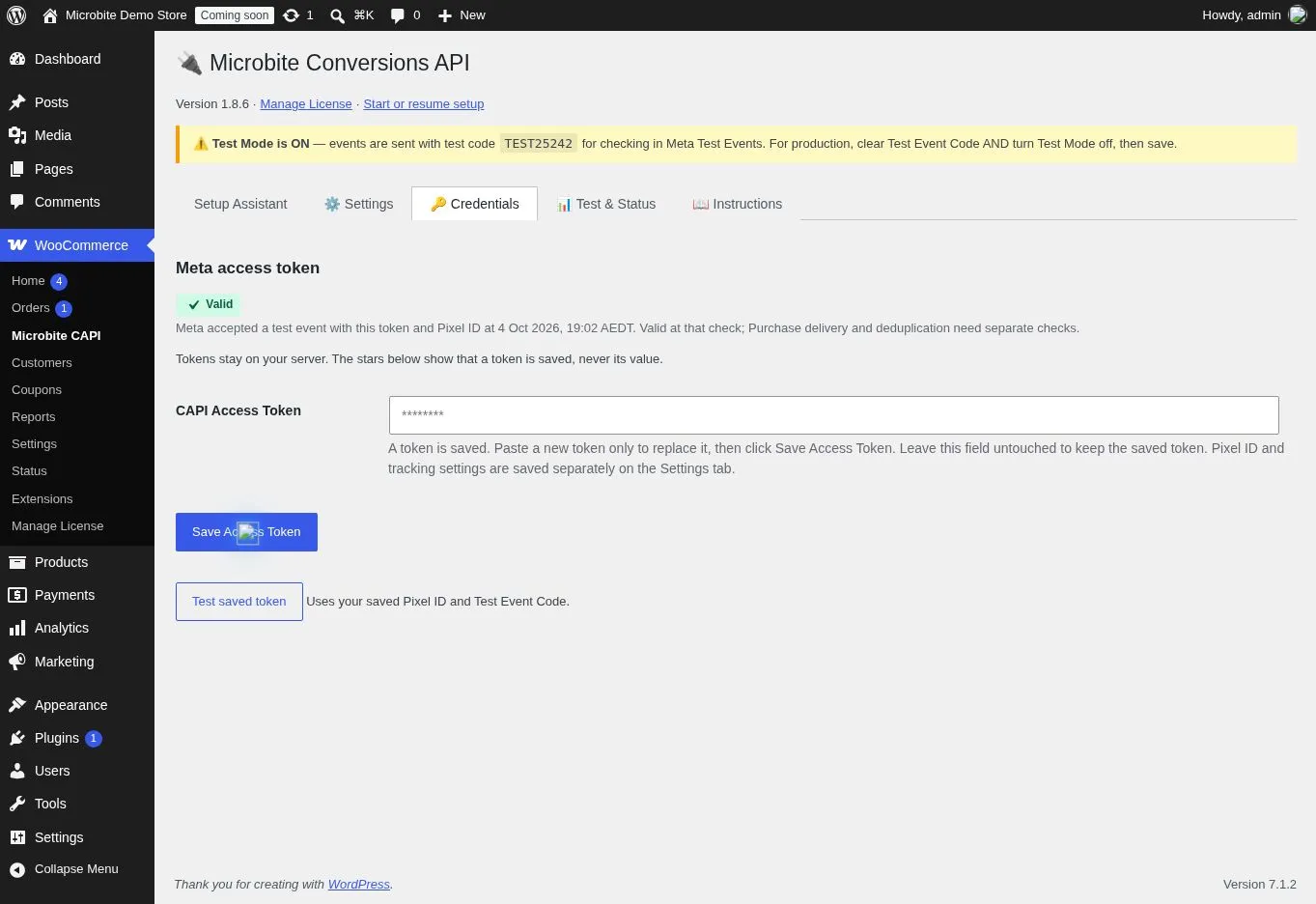
A private token. A dated connection check.
Save your access token privately in Credentials. Version 1.8.6 masks the saved token and dates the Valid badge after a successful connection test. Purchase receipt needs its own check.
 View full-size screenshot →
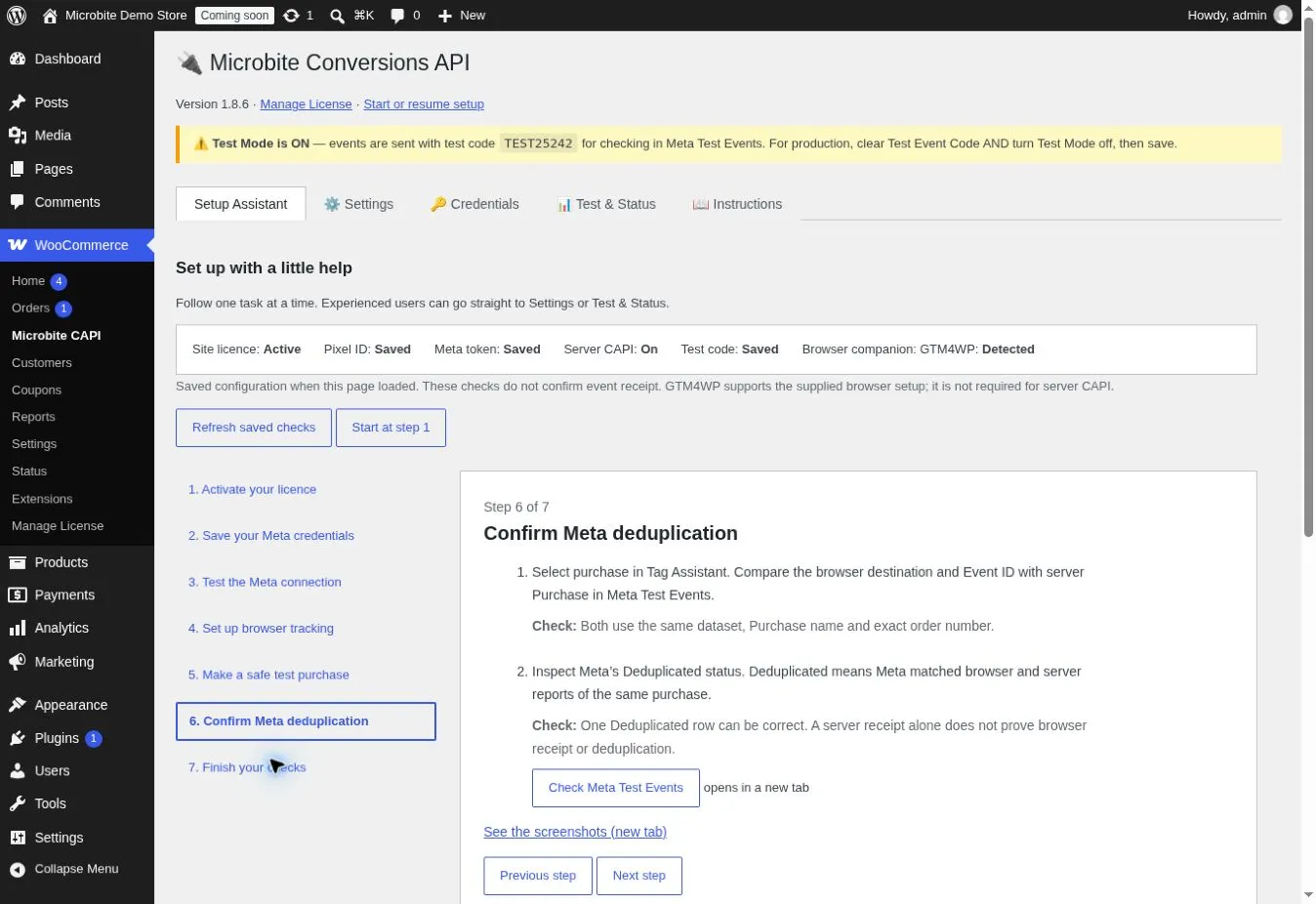
Follow setup one step at a time.
The Setup Assistant brings saved checks, seven setup stages and help with browser/server deduplication into one screen. Copy its setup message into your preferred AI assistant when you want guidance.
 View full-size screenshot →
Fresh demo captures from Microbite CAPI v1.8.6 on 4 October 2026. The Credentials check was recorded at 19:02 AEDT. The illustrated guide includes separate diagnostic PageView, Purchase and deduplication evidence. The dedicated demo remains in Test Mode.
Who it’s good for
For stores and teams that want to understand their sales signals.
WooCommerce advertisers
Add server-side purchase events to an existing Meta advertising and browser Pixel setup.
Online & in-store retailers
Send eligible WooCommerce orders created through your store or Microbite POS through the same integration.
Agencies & store managers
Work with a WordPress settings screen, a GTM starter container, test events and WooCommerce debug logs.
Connect it. Test it. Then enable it.
Get started with a test order.
You’ll need a Microbite CAPI licence, WordPress, WooCommerce, PHP 7.4 or later, and your Meta Pixel / dataset ID and Conversions API access token. Keep your access token private.
Follow the illustrated setup guideWant a hand with setup?
Use the Setup Assistant and illustrated guide, then copy a complete website prompt into ChatGPT, Claude or your preferred AI assistant. Choose from ten common setup tasks. AI guidance is optional and uses your own assistant account; it sends nothing automatically and has no live access to your store. Keep tokens, licence keys and customer records private.
Browse AI setup promptsSTEP 01
Install, activate & connect
Download the plugin and licence from your Microbite account. Activate the key under WooCommerce → Manage License, save your Pixel / dataset ID in Settings and save your access token privately in Credentials. Follow the Setup Assistant checks.
STEP 02
Align browser tracking
Configure your Pixel Purchase event with the same order-number event ID. If using the included GTM container, enter your own IDs and review its tags.
STEP 03
Check a demo purchase
Use Meta’s Test Event Code and the plugin’s connection test. Place a demo WooCommerce order and check the Purchase event and deduplication before live use.
Check how your store uses order statuses.
Version 1.8.1 can send Purchase events for pending and on-hold orders as well as payment-complete and paid-status orders. For cash-on-delivery or pay-at-pickup stores, confirm that this reflects what you want to report to Meta.
ONE LICENCE. ROOM TO GROW.
For your store.
For your next 99, too.
One purchase gives you a lifetime licence to use Microbite CAPI on up to 100 websites. A practical option for a single WooCommerce store or an agency managing several.
Bring your own WordPress and WooCommerce installation, Meta Pixel / dataset and Conversions API access token.
MICROBITE CAPI FOR WOOCOMMERCE
A$49
One payment · Lifetime use · Up to 100 websites
✓ Plugin ZIP and licence key
✓ WooCommerce Purchase event integration
✓ Connection diagnostics and test-event settings
✓ Google Tag Manager starter container
Buy through SureCart. Access your download and licence in your Microbite account.
Lifetime refers to use of the licensed plugin. It does not promise lifetime updates or support; future update and support terms are separate.
A few useful answers
Know what’s included before you connect.
Where do I get my download and licence?
After purchase, open your Microbite account and select Downloads. Your CAPI purchase includes the plugin ZIP and its licence key.
How many websites can I activate?
Each CAPI licence supports up to 100 website activations. Install the plugin on each WordPress site and activate the licence under WooCommerce → Manage License.
What does lifetime mean?
The A$49 one-time purchase covers lifetime use of the licensed plugin. It does not promise lifetime updates or support. Future update and support terms are separate.
What do I need before using it?
An active CAPI licence, WordPress, WooCommerce, PHP 7.4 or later, and your own Meta Pixel / dataset ID and Conversions API token. Configure matching browser event IDs and test your setup before enabling live sends.
Does this replace the Meta Pixel?
It adds a server-side Purchase route. You can use it alongside your browser Pixel; matching the event name, event ID and Pixel / dataset is essential for deduplication.
Which events are sent server-side?
The current WooCommerce integration sends Purchase events. The connection test sends a diagnostic PageView. AddToCart, ViewContent and other funnel events in the bundled GTM container are browser-side templates.
Does it work with SureCart?
You can buy and license Microbite CAPI through SureCart. The current customer release, 1.8.6, sends server Purchase events for WooCommerce.
The optional SureCart integration remains a private beta for paid one-time checkouts, requiring PHP 8.1 or newer. Fresh simulated guest Test orders have verified server API acceptance, refusal blocking and withdrawal-before-payment blocking. A further fresh Test checkout without a cookie plugin or visitor opt-in received Meta server Purchase acceptance while browser advertising and analytics stayed denied. Browser receipt, deduplication and the remaining release checks are still pending; SureCart tracking is not yet in the customer download.
The beta requires visitor consent by default and offers Pressidium installation and reviewed configuration. An administrator can explicitly select an Australia-only merchant-managed server Purchase policy that works without a cookie plugin. This site-wide choice keeps browser permission separate and honours recorded refusals; review your store's privacy obligations and notice. Read the setup guide, policy options and remaining checks.
Do I need Microbite POS?
No. Standard WooCommerce orders are supported. Microbite POS is an optional integration because it creates WooCommerce orders.
Are customer details anonymous?
Supported customer fields are normalised and hashed with SHA-256. Hashing is not anonymisation. IP addresses and user agents may also be sent when available; configure the appropriate consent and data-sharing arrangements for your store.
Will every event arrive, or improve ad results?
Delivery and ad performance are not guaranteed. The plugin sends events in the background and has no guaranteed automatic retry after a failed delivery. Test your setup and monitor the WooCommerce debug logs.
Can AI help me set this up?
Yes. The public setup guide has ten complete prompts you can copy into ChatGPT, Claude or another assistant, with no file download needed. The plugin’s Setup Assistant can also create a saved-status summary. You review and paste the message yourself. AI guidance does not confirm event delivery; verify receipt in Meta and optional GA4 using the illustrated checks.
Built for your WordPress workflow
Bring the order and the event closer together.
A$49 once for lifetime use on up to 100 websites. Includes the plugin download, licence key and GTM starter container. Future update and support terms are separate.
